Building a Serverless GenAI Platform on AWS
Balancing real-time performance, model cost and structured multi-agent workflows
Hi everyone! I'm Eunice, a Software Engineer Intern under AI Practice and had the opportunity to work on something I didn't expect to find in an internship: a production-minded, complex GenAI system built entirely on AWS.
What I built
How do you build a Serverless GenAI starter kit that streams responses, measures performance/cost, and chooses the appropriate model?
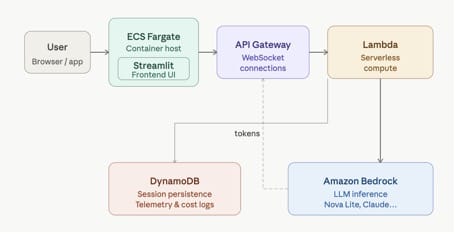
The architecture captures the core of it: a Streamlit frontend running on ECS Fargate, a WebSocket backend via API Gateway and Lambda, LLM inference through Amazon Bedrock, and DynamoDB handling both session persistence and telemetry.
1. Phase 1 — Real-time streaming chatbot
The first phase was about building a responsive chatbot — not one where you submit a prompt and wait, but one where tokens stream back in real time, the way you’d expect a modern AI product to behave.
This required coordinating three moving parts simultaneously: Lambda functions, persistent WebSocket connections, and Bedrock’s streaming inference API. Getting these to work together gave me a much deeper appreciation for event-driven architectures than any coursework ever had.
On top of the chat itself, I added per-request tracking for time to first token, total latency, token usage, and estimated cost. It’s not the most exciting part, but I quickly realised that without this visibility, it’s hard to understand how the system is actually performing.
2. Phase 2 — Model benchmarking and optimisation
Once the chatbot was running, the next question was: which model should it actually use?
To answer that, I built a benchmarking pipeline — both at the endpoint level and end-to-end — to evaluate Bedrock models (including Nova Lite) alongside external APIs via LiteLLM (specifically using GPT-4o-mini). The output was a dashboard showing P50/P95 latency, tokens per second, and cost per request across models.
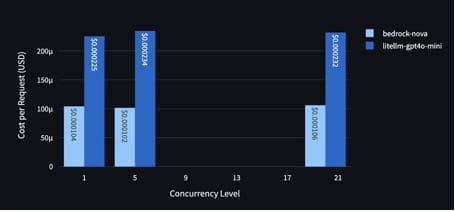
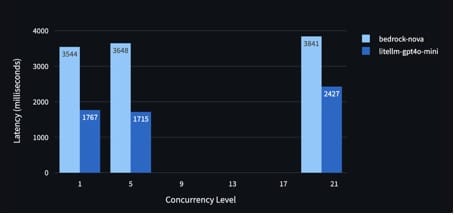
What I really took away from this phase is that choosing a model isn’t just about accuracy. There’s always a trade-off between cost, latency, and scalability. It also helped me understand why an SLM-first approach makes sense, starting with a smaller, more efficient model and only switching to a stronger one when it’s actually needed.
3. Phase 3 — Multi-agent Resolution Pack system
This was the most ambitious part of the project, and it really changed how I think about AI systems. Instead of just returning a chat reply, the system generates a structured “Resolution Pack”, including troubleshooting steps, a summary, a draft support ticket, and a recommendation on where to route the issue.
At a high level, when a user reports something like a VPN issue, the system classifies the request, asks a few clarifying questions if needed, retrieves relevant knowledge, and then decides which model to use (starting with a smaller model and escalating only if necessary). It then produces the final output along with an audit trail.
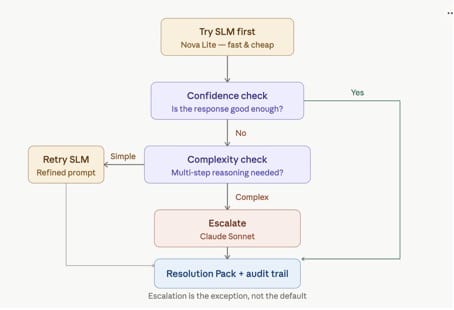
This was my first real exposure to agent-based systems, including workflow orchestration, tool-based design, and model escalation. It shifted my perspective on AI, from thinking of it as just a chat interface to seeing it as a structured workflow that can reason and make decisions.
Engineering lessons
Working on this project helped me build my skills in a way that felt connected rather than scattered. On the infrastructure side, I gained hands-on experience with AWS services like Lambda, API Gateway, DynamoDB, and ECS Fargate, and learned how they work together in a serverless system.
On the AI side, I worked with LLM APIs, streaming responses, prompt design, and basic model evaluation.
Tying everything together was system design: learning how to make trade-offs between latency, cost, and complexity, while ensuring the system remains observable and easy to monitor.
Beyond the technical
What really made the experience memorable was the environment, a team that was open about sharing knowledge and having honest discussions around product decisions. I also got to see how ideas evolve from initial concepts into prototypes and eventually something closer to production, which is not something easily replicated in school projects.
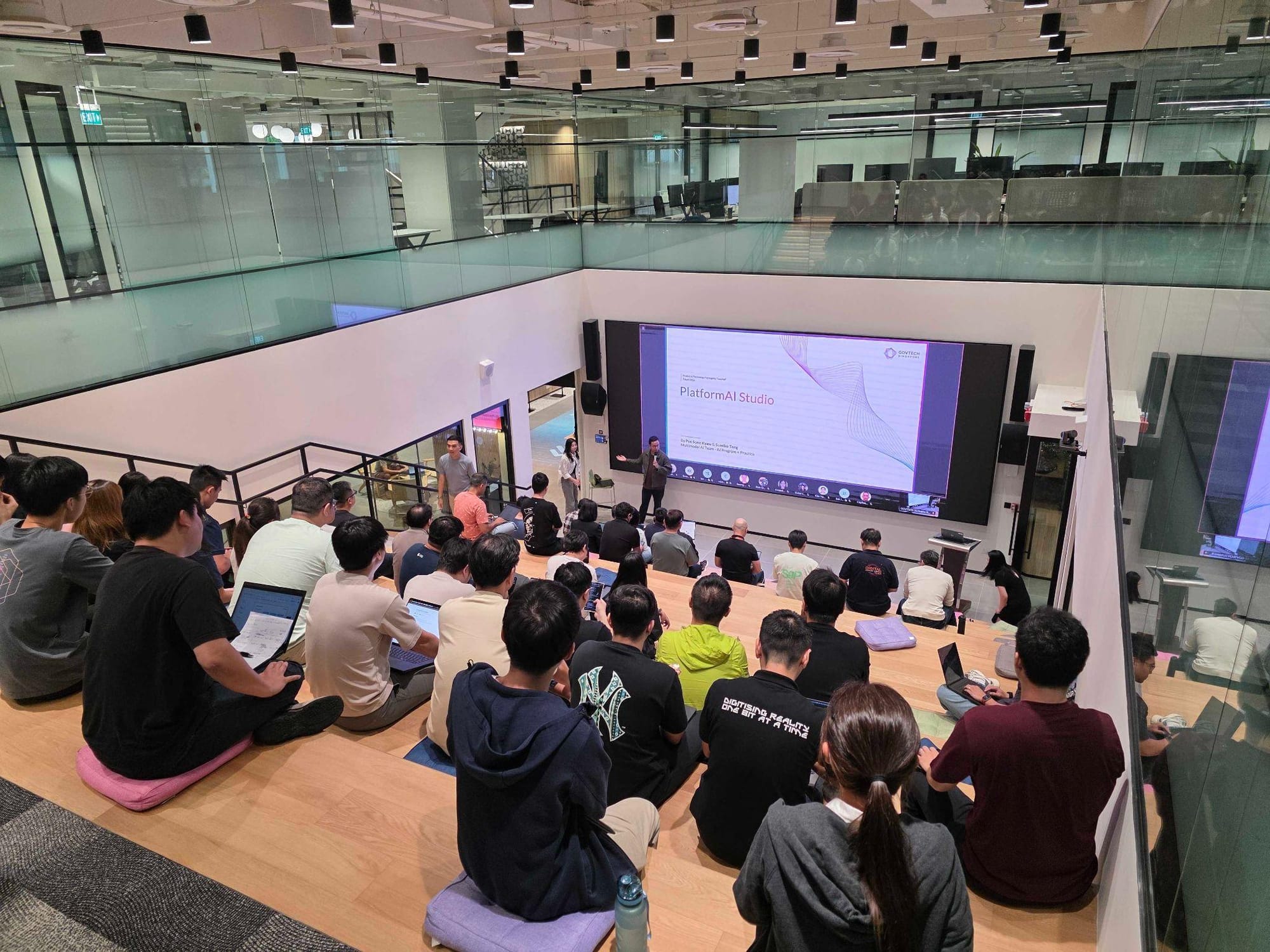
On top of that, the biweekly AI/ML sharing sessions were a highlight for me. They gave me insights into a wide range of projects and how different teams approached their problems.
Final Thoughts
I came into this internship wanting to strengthen my software engineering foundations and go deeper into cloud infrastructure and AI systems. While I had prior exposure to AWS, I sought to understand how production GenAI systems are actually designed, deployed and scaled - from serving LLMs to designing systems that are both scalable and cost-efficient. Most importantly, I left with a much clearer sense of what I actually enjoy working.
A big part of that growth came from how the internship was structured. The onboarding process was very well thought out, with a detailed Notion guide that made it easy to get up to speed with the tech stack, internal tools, and expectations. It removed a lot of the usual friction at the start and let me focus on learning and contributing from early on.
Another highlight was the intern project, where all interns across different backgrounds to build something end-to-end as a team. Beyond the technical learning, it gave me a better appreciation of how to scope problems, iterate quickly, communicate ideas clearly, and work with people with different perspectives.
If you’re early in your journey and interested in this space, I’d encourage you to explore opportunities like this. Working on real-world problems alongside supportive teams was incredibly valuable, and an experience I’d highly recommend. :)
Note: This article was written by Eunice, who has since completed her internship, and published on her behalf by Ryan Lin.