ORCA: one platform, many agents, working together
GovTech's MOM team built it to unify AI tools for analysing data, drafting slides and checking compliance
Problem #1: Too many apps
Picture a user starting on a piece of work by analysing text and checking documents. Before anything else, they must first identify an app suited for the task at hand. But which app to use for text analysis, or compliance checks? Where to source them? Every tool means another URL, another login. Even if the right tool exists, hunting it down is half the battle.
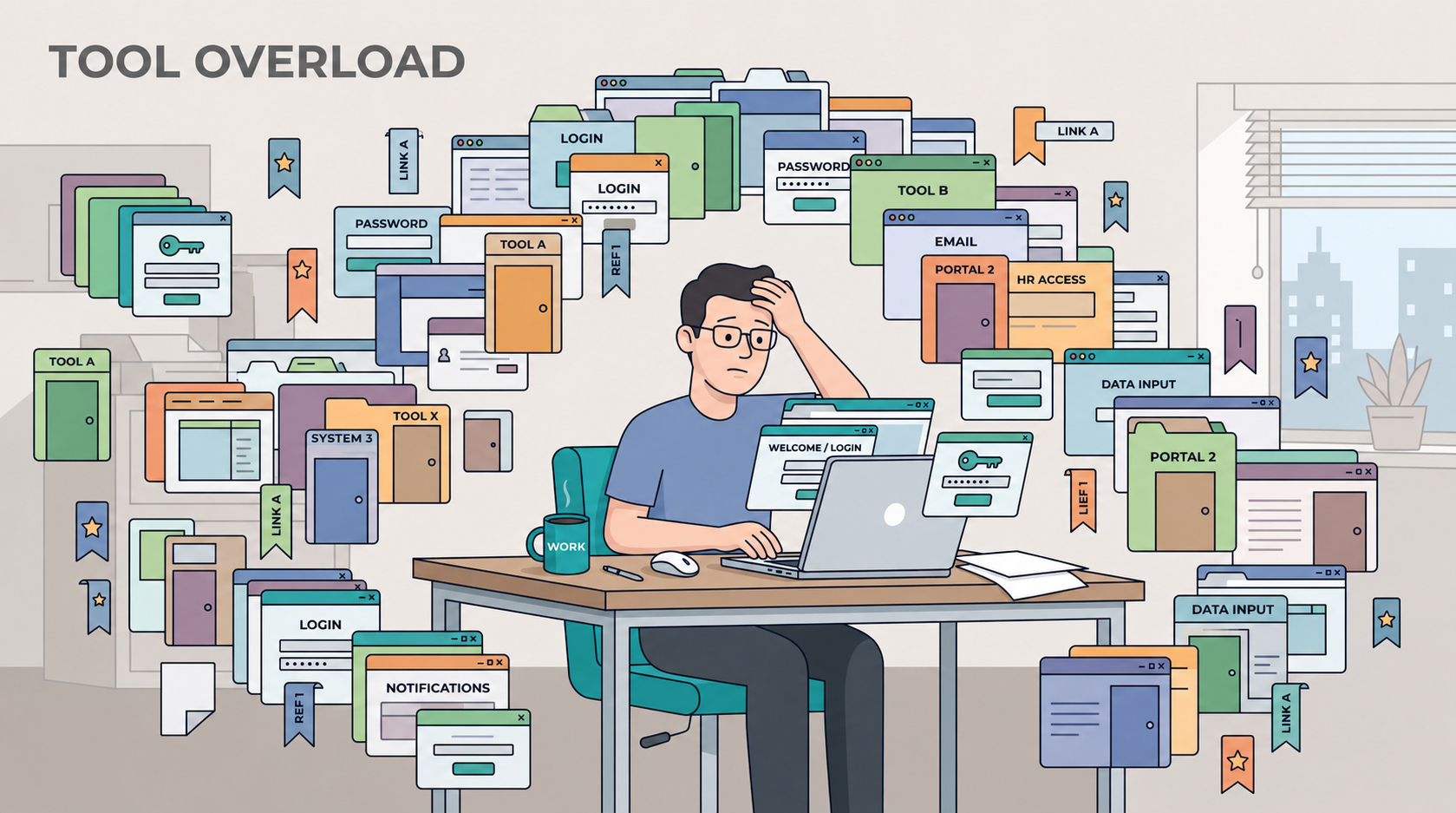
A Harvard Business Review study put a name to the mental cost of constantly switching between apps and tabs: the "toggling tax". Beyond “Alt-Tab fatigue”, there is a cognitive load to remembering which tool to use for what task, where to find it, and how to get everything done before the session times out – all adding up and increasing the burden of doing the job itself.
GovTech’s Forward Deployed Team (FDT), embedded within the Ministry of Manpower (MOM) Co-Lab, faced these issues when trying to make it easier for users to adopt the AI apps developed:
Sensemaker helps users cluster, classify, and make sense of large volumes of text such as survey responses, transcripts, open-ended form fields, and other documents that would require many hours to review manually.
DocuPulse reviews slide decks and documents and gives users concrete feedback on clarity, structure, and messaging before the deliverable goes out.
ValidateIt checks documents against any set of pre-defined rules, such as policy or compliance requirements, and flags exactly where a document falls short.
4,000 users across almost 80 agencies use these apps. But while these apps were useful, they operated largely in isolation; that isolation, multiplied across a growing catalogue of tools, was becoming a problem in its own right.
Problem #2: When a good tool starts to get complicated
We first recognised this limitation through our Sensemaker app, as it assumed a tidy path: upload your file, pick an analysis, retrieve the output in the form of clusters or classifications. However, real work rarely starts and stops there. For example, data needs cleaning before analysis, and results need to be merged, exported, or reshaped into a format preferred by the intended audience. Even if the app produces good output, users still need to put in more work to make it truly useable.
From the developer’s standpoint, as requests come in to adapt workflows to suit specific team or use case needs, the instinct is to add more features. While understandable, this can backfire. Bolt on another button to a rough edge, and one button soon becomes five; five become an "Advanced Settings" tab. Months later, a user may open the app and find it unrecognisable from the originally intuitive, user-friendly tool.
Problem #3: Cost of maintaining too many apps
The same pattern emerged across other apps. If every workflow variation becomes a new feature or app, the overhead of managing these would eventually outweigh the value delivered; each app we deploy needs its own login, deployment process, and maintainer. Taken together, these impose a growing operational tax.
As a small team managing a comprehensive app portfolio, we need to be deliberate in how we allocate resources. Without careful prioritisation, we risk placing the burden of managing and maintaining multiple apps on individual team members.
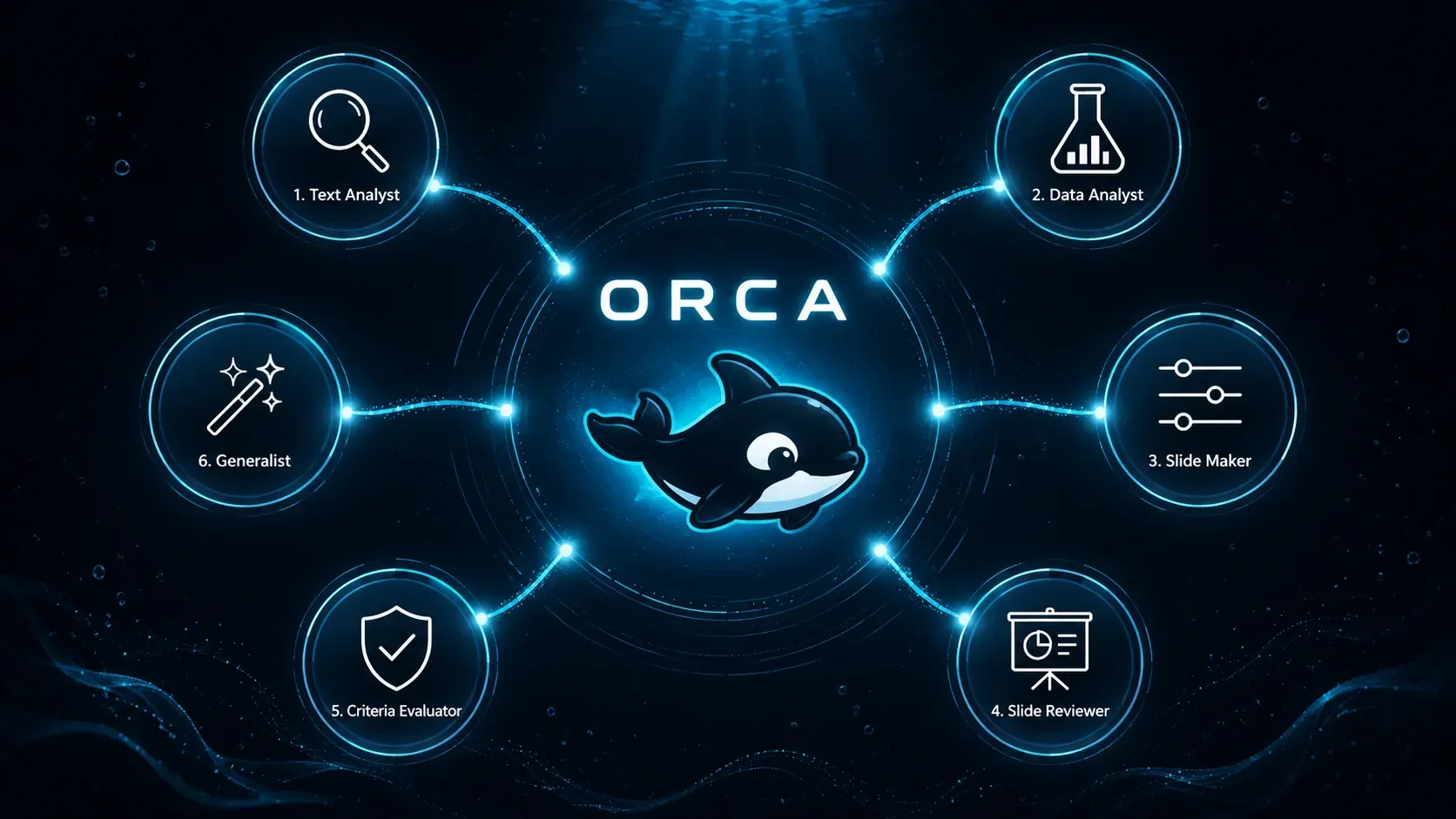
ORCA: one platform, many agents, working together
ORCA (ORchestrated Co-Lab Agents) brings the MOM FDT's AI tools into one conversational chat for users. Describe a task in plain English, and ORCA's agents take it from there – performing not just one task, but a chain of them. Users can analyse data, feed the findings straight into a slide deck, then have the deck critiqued and refined. One session, full context, zero shuttling files between apps. If you’re on the Government Enterprise Network, try it at: go.gov.sg/orca
As of July 2026, ORCA had 1000+ users from 60+ government agencies. Hear from our users:
“What stood out about Orca was how thoughtfully it was designed for public officers and the work that we do. From data analysis to drafting and critiquing presentations, the seamless integration makes it an end-to-end platform for our workflow. Definitely worth trying it out!” - Cerelia Chng, Civil Service College
"As ORCA enabled us to perform exploratory text analytics with great efficiency and reliable accuracy. Its ability to orchestrate multiple agents within a single workflow significantly reduced the time needed to transform raw data into preliminary insights — cutting what once took 2-3 days down to 5-6 hours.” - Yi Da Tan, Public Service Division
Let’s walk through how a typical user might experience ORCA.
A user staring at a spreadsheet full of citizen feedback sees the usual mess – emails, hotline notes, timestamps, half-filled category columns, and long free-text rants – and tries to make sense of it. What are people unhappy about this month? What’s trending? What needs attention first?
Instead of juggling multiple tools, the user completes the whole workflow in ORCA. They open a chat, drop the file in, and ask to pull out the main themes. The Text Analyst agent (Sensemaker's text-analysis engine, now living inside ORCA) clusters the feedback and summarises recurring complaints, outlier data points, and issues that need escalating. To organise this information into a structured format, the Data Analyst agent will take over and generate a report from these findings.
Next, the user wants to create a presentation to report their findings. The Slide Maker agent picks up the clusters generated earlier, and drafts the slides. No re-uploading, no copy-pasting findings into a second tool. All the context needed to perform the deck creation is carried forward from the previous task in ORCA.
Finally, the user can also choose to review and improve the deck. The Slide Reviewer agent goes over the draft and identifies areas for improvement: reduce busy content to emphasise the header, clarify vague labels, strengthen a weak closing ask. The user sends that feedback straight back to Slide Maker agent, which refines the deck.
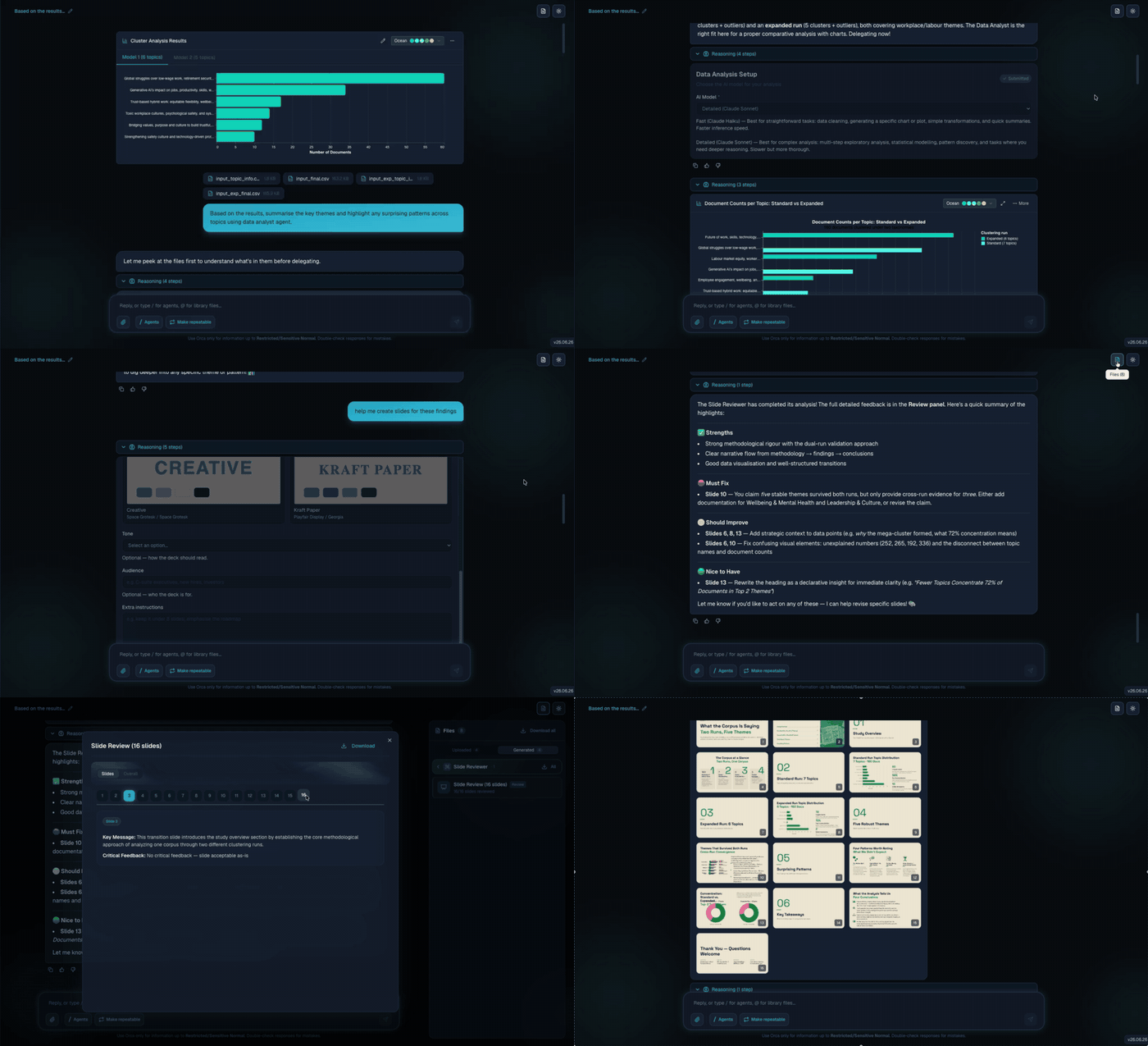
In this entire workflow, four different ORCA agents do the work without the user having to switch tabs or sessions. Through deliberate design for continuity, everything stays in one session, with seamless handoffs between agents.
Architecture
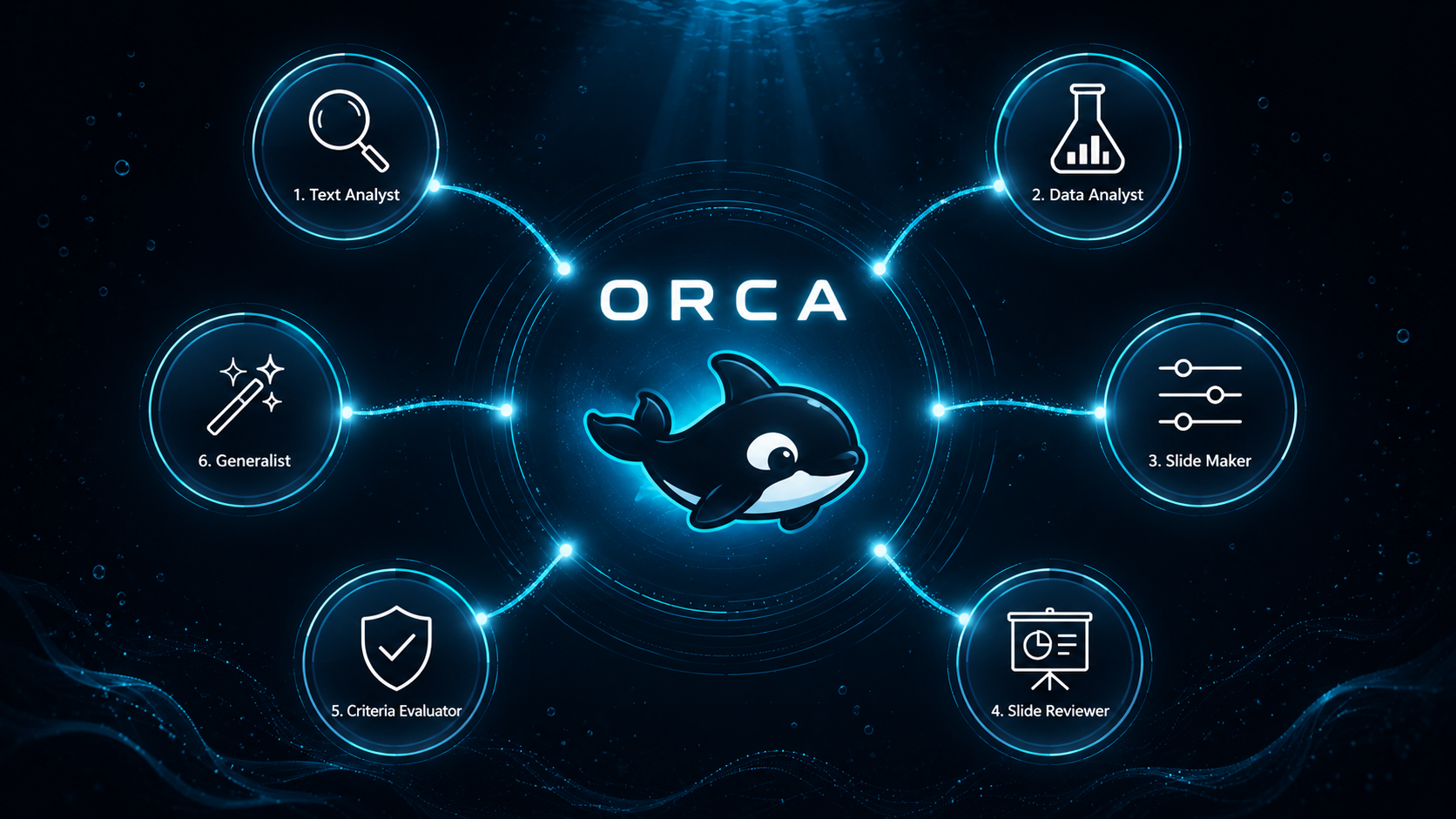
ORCA follows a hub-and-spoke model. ORCA sits at the centre, while specialist tools connect around it.
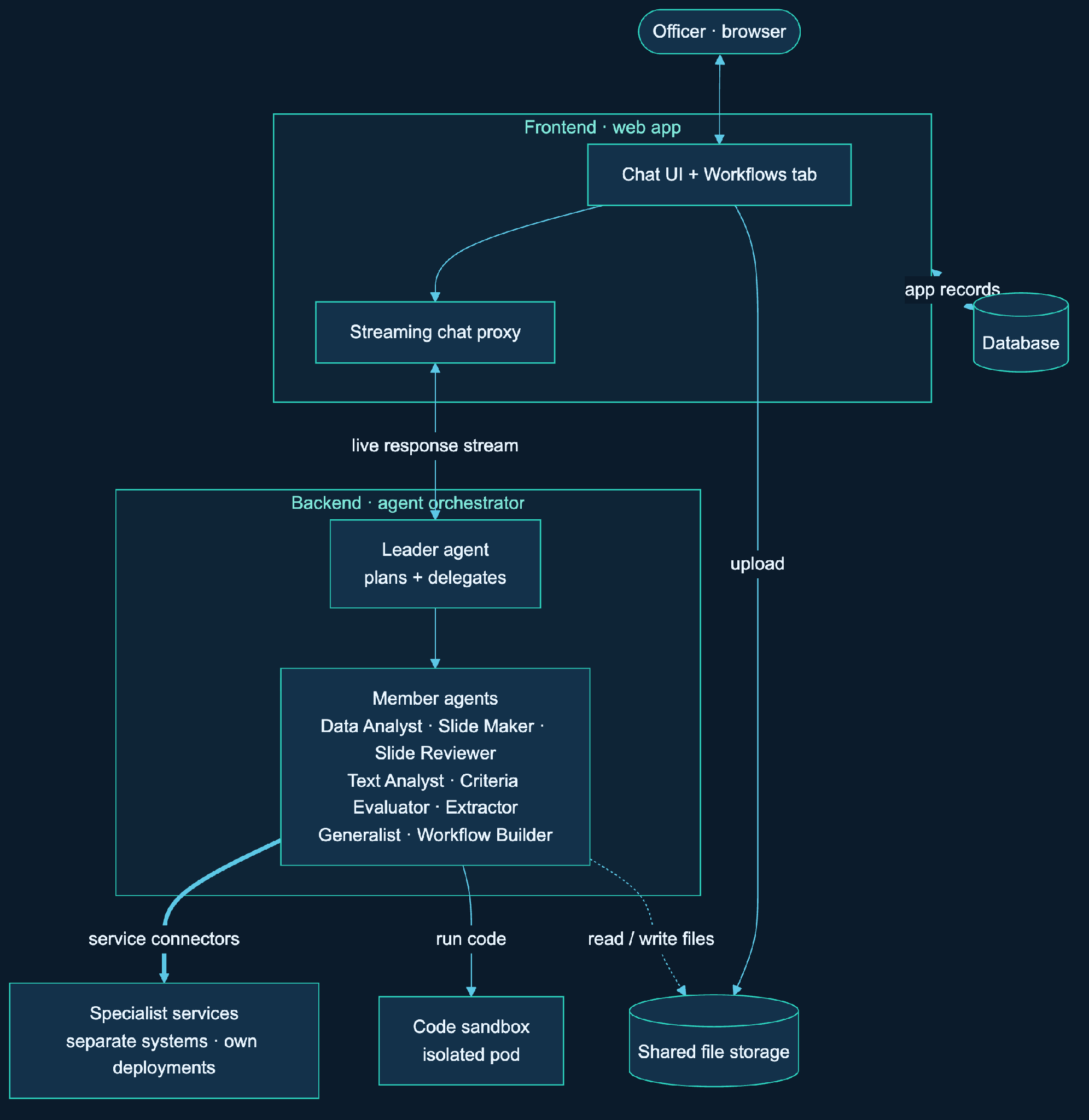
The key takeaway from the diagram is what ORCA does not try to do. It does not absorb all our existing apps into one monolithic backend. That may look clean on a slide, but in production it becomes difficult to debug, maintain, and evolve. Instead, ORCA owns the shared plumbing: chat, sessions, routing, guardrails, file references, and response streaming, while connecting to other specialised apps and services.
When a request comes in, the backend decides where it goes. A leader, who acts as the orchestrator, reads the message and hands it to a member agent. That member might call an external service (e.g. Sensemaker text-analysis engine), or it might write a small Python script and run it in an isolated code sandbox.
This is what lets the user feel like they are talking to one assistant while the actual work is spread across separate, independently hosted services. Uploaded and generated files live in shared storage, app records live in a database, and every specialist service is still owned, deployed, and improved by its own team.
Keep specialist services outside the platform
While we could have pulled all the codebases of specialist services into ORCA’s repository, it would have reduced maintainability. Bug fixes and feature requests across multiple products would then be tied to a single release process, increasing coordination overhead and slowing delivery.
The specialist apps already had their own developers, servers, and release schedules. We wanted ORCA to connect to that existing setup, not take it over.
This is also how ORCA addresses the engineering cost described earlier. Previously, if a team built a useful document parser, they still had to wrap an entire product around it before any user could use it. With ORCA, the team only needs to host the API, and ORCA provides the surrounding platform layer: chat, login, file storage, and handoff logic.
Your tool gets platform-level reach without becoming platform-owned.
Today, a service can join ORCA through one of three routes:
- REST, for a normal web API. This is what the live services use right now: Sensemaker, DocuPulse, and ValidateIt are all web APIs that ORCA calls over the network. If you already run an API, you join with a thin adapter, not a rewrite.
- MCP (Model Context Protocol), for teams that expose their tools through an MCP server. ORCA speaks MCP, so it can read those tool definitions and pull them in as a capability.
- A2A (agent-to-agent), for teams that already have a full agent and want it to talk to ORCA's orchestrator as a peer, instead of being broken down into tools.
Quick caveat: MCP and A2A are built and tested in our code, but the live production services all run on REST for now.
ORCA gives teams a migration path that preserves ownership. A team can bring a tool into ORCA without giving up its codebase, release cycle, or ownership. Sensemaker is the clearest example. The same engine that users previously accessed in a separate tab can now run within the chat, providing the same capability without a separate login. The team that built it did not need to rewrite any core functionality to make this possible.
Preserving team ownership comes at a cost, because when ORCA depends on services it does not directly control, failures become harder to predict. One service might respond slowly. Another might be interrupted mid-deployment and hand back a changed response structure. An authentication token might expire halfway through a long-running job. ORCA has to absorb all these issues quietly, without having the user troubleshoot which backend service went wrong.
In practice, that means handling timeouts and retries, checking schemas, showing progress, and turning raw technical failures into error messages that actually help. That is the trade-off. Teams keep ownership of their services, and ORCA takes on the work of making those services feel like a single, coherent experience.
Conclusion and next steps
ORCA changes how AI capabilities are built, accessed, and maintained. It once demanded a full app complete with frontend, login, deployment, and a maintainer tied to it for good. With ORCA, the platform absorbs that overhead once, and a new capability is just an API away. Product teams keep what's theirs, and users get one front door. Users work from one place instead of switching between apps.
None of this makes the underlying work simpler. Orchestration can misroute. External services fail in ways we do not control. In subsequent posts, we will elaborate on techniques we used to overcome these issues, as well as other challenges like optimising cost and retaining session context across long conversations.
ORCA is still evolving, and our internal catalogue of agents continues to grow as we collaborate with more teams to connect their specialised tools to ORCA. If you have a tool for government officers that is available via API, MCP, or A2A, we would like to hear from you. You bring the tool. ORCA brings the reach.
If you’re on the Government Enterprise Network, give ORCA a go at: go.gov.sg/orca
Credits
ORCA is a team effort. The core engineering team comprises GovTech engineers Ethan Mak (lead), Dr. Joel Koo, Shuan Ang, and MOM engineer Dr. Winston Pang. Notably, the Slide Maker agent was developed by Dr. Winston Pang and the Data Analyst agent by our intern Chia Ren Cong.
Building the platform is only half the job. Annalyn Ng, our product manager, guided ORCA from conception to launch and beyond, Jasmine Chua, our chief engagement officer, brings users on board and keeps them coming back, while Esther Lim, our creative director, oversees ORCA's design spanning its UI/UX to promotional fliers.
Finally, ORCA would not have been possible without the steadfast support of MOM's leadership team: Eu Gene Ng, Deputy Director of Co-Lab, as well as Jeremy Huang, former Director, and Leong Wei Jian, current Director of the Strategic Planning and Transformation Department.